Verifier workflows
Verifier onboarding to Base Registry
This section explains the creation of an additional identifier for the Verifier role, next to the Partner ID and Issuer identifier.
DID isolation
Ideally, the Verifier should/could be an entirely separated entity thus going through its own set-up process (with its own DID). But for the beta/testing purpose phase, the Business Partner identity is still being used - which also fits my set-up.
This is quite an important point. What we'd like is no tracking of personal transactions : this is the design purpose (transparency, decentralisation). If Issuer and Verifier share the same identity, it defeats that purpose. This should be alleviated at a more advanced stage.
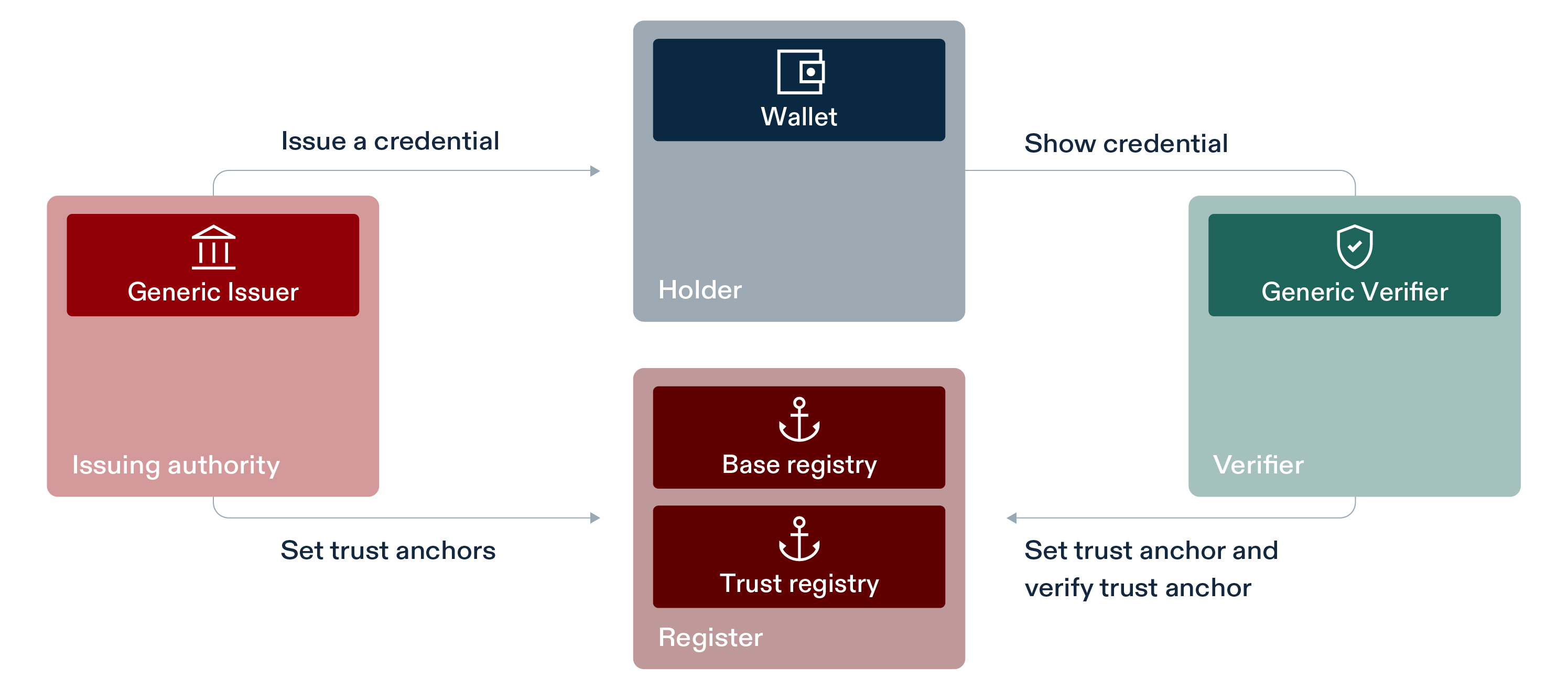
SWIYU Trust Infrastructure : Roles
Verifier DID creation and upload
The below mermaid flowchart aims at describing the different steps & identities.
flowchart TB
    BP{{Business Partner: Atarigo}}

    BP --> ISSUER_DID[Issuer DID]
    BP --> VERIFIER_DID[Verifier DID]

    ISSUER_DID --> ISSUER_ID_APP[Issuer Identity App]
    VERIFIER_DID --> VERIFIER_ID_APP[Verifier Identity App]
    ISSUER_DID --> ISSUER_ST_APP[Issuer Status App]
    VERIFIER_DID --> VERIFIER_ST_APP[Verifier Status App]

    ISSUER_ID_APP -.->|subscription| ID_API[Identifier API]
    ISSUER_ST_APP -.->|subscription| STATUS_API[Status API]

    VERIFIER_ID_APP -.->|subscription| ID_API
    VERIFIER_ST_APP -.->|subscription| STATUS_API

    ID_API --> BASE_REG{{Base Registry}}
    STATUS_API --> BASE_REG

    style ISSUER_DID fill:#3498DB,stroke:#2874A6,stroke-width:2px,color:#fff
    style VERIFIER_DID fill:#3498DB,stroke:#2874A6,stroke-width:2px,color:#fff
As a result, we'll need to handle separete .env configurations : swiyu_issuer_env.txt and swiyu_verifier_env.txt. The way these are meant to be used : as you progress in the workflow, add/update the variables in the .txt file and source the file iteratively again.
What worked best for me (leveraging Base Registry cookbook):
- Set defaults in swiyu_env_verifier.txt
- Create Verifier_ID and Verifier_ST apps in API self-portal
- Subscribe to Identifier and Status APIs in API self-portal
- Retrieve Access + Refresh tokens || one customer key/secret per app
- CUSTOMER_KEY , CUSTOMER_SECRET , ACCESS_TOKEN , REFRESH_TOKEN
- note: if you refresh token or subscription, Customer_ is same (/app)
- Update swiyu_env_verifier.txt || source it
- curl : Use {Access Token + Partner ID} to generate new entry space (one Partner ID can have multiple entries)
- Returns: IDENTIFIER_REGISTRY_ID (space UUID) + identifier_registry_url
- Update swiyu_env_verifier.txt || source it
- didtoolbox >> {identifier_registry_url} generates key pairs and DID log JSON
- Output: didlog.jsonl with the DID embedded (the DID is cryptographically bound to the specific registry URL)
- curl : Upload JSON to registry using {Access Token + Partner ID + IDENTIFIER_REGISTRY_ID}
- Success! DID is now publicly resolvable 🎉
What this means : anyone who has the DID can now check if that DID is officially listed within the Base Registry.
Verfier environment set-up
Our goal is to be able to create a Verifier webpage that shows a QR-code that
- Is signed as registered Verifier
- Requests specific items from an Issuer VC.
After cloning the generic swiyu-verifieer git repository, extra configuration points are required before starting the Docker service. Key files are the Docker compose.yml and the .env.
| Name | Description | Example |
|---|---|---|
| EXTERNAL_URL | This will be used to build the correct verification_deeplink (You must provide the /oid4vp endpoints there) -> must use https-protocol otherwise the wallet will refuse to connect. | |
| VERIFIER_DID | DID you created during the onboarding | did:tdw:QmejrSkusQgeM6FfA23L6NPoLy3N8aaiV6X5Ysvb47WSj8:identifier-reg.trust-infra.swiyu-int.admin.ch:api:v1:did:ff8eb859-6996-4e51-a976-be1ca584c124 |
| DID_VERIFICATION_METHOD | Verification method, which can be taken from the did log response. The Verification Method must match the selected SIGNING_KEY! onboarding process method | did:tdw:Qmd9bwsodZ1GAz4h8D7Vy6qRio78voXifDrnXokSTsMVQK:identifier-reg.trust-infra.swiyu-int.admin.ch:api:v1:did:18fa7c77-9dd1-4e20-a147-fb1bec146085#auth-key-01 |
| SIGNING_KEY | EC Private key, which can be taken from onboarding process you can use any generated key but it must match the DID_VERIFICATION_METHOD |